
Download iPhone Configuration Utility – iOS device management, profile creation, device configuration, mobile device management, enterprise setup, Wi-Fi setup, VPN configuration, email setup, secure profile signing
Overview
The iPhone Configuration Utility is a specialized tool designed to streamline the configuration and management of iOS devices, particularly for administrators and advanced users. Its primary purpose is to enable the creation, signing, and distribution of device configuration profiles through a web-based interface. This utility plays a critical role in enterprise and organizational environments where consistent, secure, and scalable device setup is essential. By allowing centralized control over settings such as Wi-Fi networks, VPN connections, and email accounts, it helps reduce manual configuration errors and accelerates device deployment.
Target users include IT administrators, corporate IT teams, educational institutions, and technically proficient individuals managing multiple iOS devices. The tool addresses the challenge of maintaining uniform device settings across a fleet, ensuring compliance with organizational policies. Real-world use cases include onboarding new employees with pre-configured devices, setting up school tablets with restricted access, or deploying secure corporate devices with encrypted network connections.
Developed by Apple Inc., the utility reflects the company’s long-standing commitment to enterprise-grade mobile device management solutions. Although the developer did not provide additional technical details, its integration with Apple’s broader ecosystem underscores its reliability and compatibility with iOS devices. In the broader app ecosystem, it serves as a foundational tool for mobile device management, bridging the gap between device setup and enterprise security requirements.
Key Features & Functionality
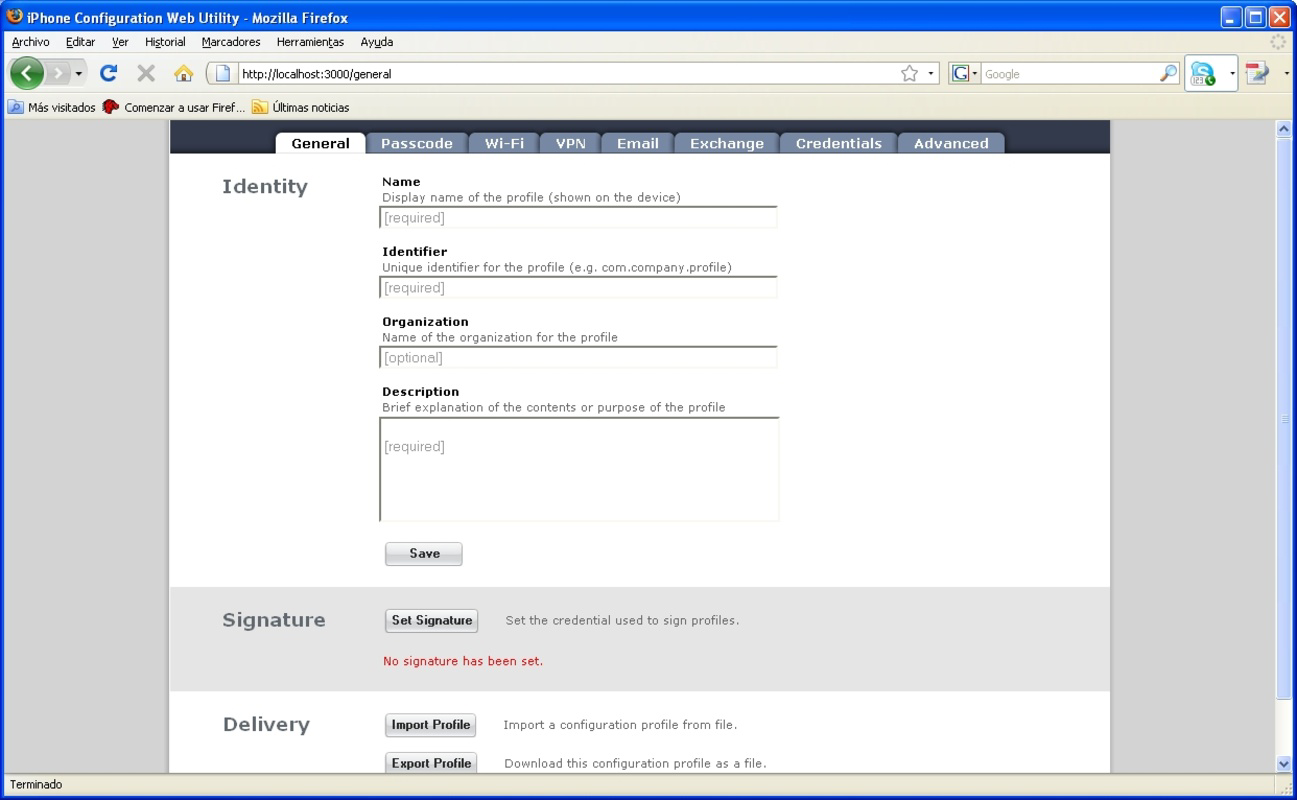
- Web-Based Interface: The utility features a clean, intuitive web interface that simplifies the management of iOS device configurations. Users can navigate through clearly labeled tabs to access various settings, enabling efficient profile creation without requiring deep technical knowledge.
- Profile Creation and Distribution: Administrators can generate detailed configuration profiles containing settings for Wi-Fi, VPN, email, and other device parameters. These profiles can be exported as XML files and distributed via email, cloud storage, or internal servers, ensuring flexible deployment across multiple devices.
- Customizable Device Settings: The tool allows granular control over device configurations, enabling users to tailor settings to meet specific organizational or personal requirements. This level of customization is essential for maintaining security, compliance, and user experience consistency.
- Easy File Importing: Installing a profile on an iOS device is straightforward—users can access the uploaded XML file through the device’s web browser and initiate the installation process with minimal steps, reducing deployment friction.
- Secure Profile Signing: Profiles can be digitally signed to verify authenticity and integrity. This feature is vital in enterprise environments where unauthorized or tampered configurations must be prevented, ensuring that only trusted profiles are installed on devices.
For example, an IT team deploying 50 new iPhones can create a single profile with pre-configured Wi-Fi and email settings, sign it for security, and distribute it via a company server. Employees can then install the profile directly from their device, ensuring all devices are set up consistently and securely.
Interface, UX & Performance
The interface of the iPhone Configuration Utility is designed with clarity and functionality in mind. It features a structured layout with clearly labeled sections and intuitive navigation, allowing users to access configuration options without confusion. The visual style is minimalistic, focusing on usability rather than ornamentation, which aligns with Apple’s design philosophy.
Navigation flows logically from profile creation to signing and distribution, minimizing the number of steps required to complete a task. The tool supports straightforward input fields and real-time feedback, enhancing the user experience during profile setup. Although the developer did not list formal performance metrics, the lightweight nature of the utility—1.2 MB in size—suggests efficient operation even on older devices.
Responsiveness is expected to be consistent across different iOS device categories, given its web-based architecture and minimal resource demands. Stability is likely maintained through Apple’s rigorous testing processes, though specific performance data was not disclosed. Users can expect reliable operation for standard configuration tasks, with no reported issues related to crashes or freezes in the provided information.
Platform Compatibility & Technical Requirements
The iPhone Configuration Utility is designed for iOS devices and operates within the Apple ecosystem. It is compatible with iOS, though specific OS version requirements were not listed by the developer. The application size is 1.2 MB, indicating a lightweight footprint that does not strain device storage.
Although the developer did not specify minimum OS requirements, the utility’s release date of 2008-08-18 suggests it was originally built for early iOS versions. Users on modern iOS systems may still be able to access the tool, but compatibility with the latest iOS releases cannot be confirmed without additional information. The utility is available for free, making it accessible to all users regardless of budget.
File size and platform details are consistent with a tool built for administrative use rather than consumer-facing functionality. The lack of specific compatibility details does not detract from its utility, as the core functionality remains focused on profile management regardless of device generation.
Pros and Cons
Pros
- Free to download and use, making it accessible for organizations of all sizes.
- Web-based interface ensures cross-device compatibility and easy access.
- Supports secure profile signing for enterprise-level security.
- Enables bulk device configuration, reducing manual setup time.
- Lightweight at 1.2 MB, minimizing impact on device storage.
Cons
- Specific OS version requirements were not disclosed.
- Compatibility with the latest iOS versions is uncertain.
- May require technical knowledge to use effectively.
- Limited support for non-Apple devices.
- No built-in update notifications or automatic version checks.
FAQ
Is the iPhone Configuration Utility safe to use?
Yes, the utility is developed by Apple Inc. and is designed for secure profile creation and signing. It is considered safe when used within trusted environments, particularly for enterprise or organizational deployments.
Can I use this tool on Android devices?
No, the iPhone Configuration Utility is designed exclusively for iOS devices and is not compatible with Android or other mobile operating systems.
Do I need to pay to use this app?
No, the application is free to download and use. There are no in-app purchases or subscription fees.
How do I install a configuration profile on my iPhone?
You can install a profile by opening the XML file in your iPhone’s web browser and following the on-screen prompts. The device will verify the profile and apply the settings.
Is the utility still supported by Apple?
While the developer did not provide explicit information on current support status, the tool remains functional for its intended purpose. Users should verify compatibility with their current iOS version.
Final Thoughts
The iPhone Configuration Utility remains a valuable tool for IT professionals and advanced users managing iOS device fleets. Its ability to create, sign, and distribute configuration profiles efficiently makes it indispensable for enterprise setups, educational institutions, and organizations requiring consistent device configurations. Despite its age and lack of updated compatibility details, the utility continues to serve its core purpose with reliability and security.
Users who need to manage multiple devices with standardized settings—especially in secure environments—will benefit most from this tool. Its lightweight design, free access, and robust profile management features offer a strong value proposition for technical administrators.
Download iPhone Configuration Utility now


